With this datapane you can sign up for the HelmSmart-Cloud Alert service
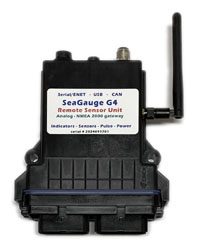
SeaGaugeG4 and SeaSmartG3 devices can send data directly to HelmSmart-Cloud services using any internet connection where it is stored in real time for off-line analytics,
Stored data can be time series graphed or overlayed on google maps.
You can also create customized real-time dashboards and virtual insturmentation pages.
HelmSmart-Cloud also offers a seperate real-time Alerts module which analyzes incoming sensor data with configured alert thresholds to generate Alerts via configured Emails and SMS trigger. It is also possible to have alerts trigger on-board relay drivers (SeaGaugeG4) and embedded PWM lighting controllers (SeaSmartG3)
The HelmSmart-Cloud Alert service is a paid subscription. You can purchase monthly or yearly service plans.
Subscription plans do not auto renew and you must repurchase plans at end of term to continue service.
Use the PURCHASE buttons below to select your desired plan and enter payment information
When entering your purchase information, you must verify the correct DeviceID in the PO Number field as shown.
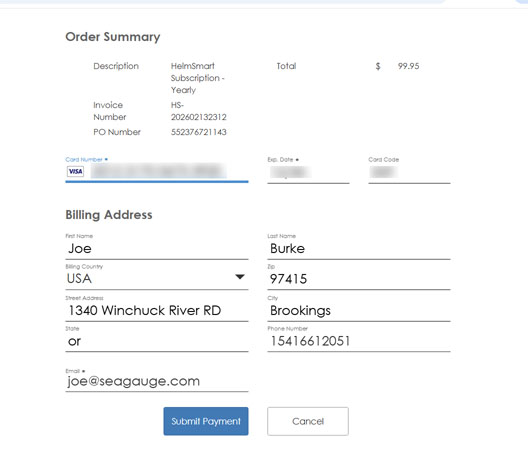
HelmSmart-Cloud will use the email and phone numbers entered on the purchase form for sending alerts.
Be sure to enter a valid email for receiving your account invitation/confirmation and temporary password. You will be able to reset your password on first login
Using a phone number for SMS Alerts is optional. If entering a SMS phone number, be sure to include the country code or 1 for USA based numbers.
You will be charged receive SMS rates by your carrier depending on your plan. You can opt out of SMS messages by leaving the phone number blank or disabling SMS alerts in the ALERTS configuration page
After your purchase is completed, you will receive a confirmation/invitation email with your username (deviceID) and a single use temporary password with a link to the HelmSmart-Cloud device management page where you can create your initial login and reset the temporary password.
You will need to click the Manage: Guest - login button to initiate the sign-in

Once you are logged into your device management page, you will need to validate your new account email and SMS phone before you can start receiving alerts.
The SUMMARY tab will list all registered devices under your email account but only enable the currently logged in device. If the email or SMS phone are displayed in red - you will need to first validate them before use.
Select the MODIFY tab and click on the Alert Email or Alert SMS fields to complete validation and opt in to receive Alerts.
To modify a different device, you will need to first log out of the current device by selecting the HelmSmart link at the top of the page
By purchasing a subscription plan you agree to have configured alert messages sent to provided email and phone numbers for the duration of subscription. You can disable messages by removing email or phone number from alert configuration.
If you already have purchased a Helmsmart-Cloud Alerts Subcription, use the LOGIN button at the top of this page to enter your account information then use the Summary tab to view your enabled devices and configure email and SMS phone numbers for receiving Alerts.
To configure actual sensor alerts for each device - use the ALERTS button on the main HelmSmart-Cloud home page
Yearly subscriptions are offered at a 10% discount from monthly plans
|
|
||
| Device ID | Name | Subscription | Expires | API | Status |
|---|